Your AI Agent Doesn't Know What to Do Next
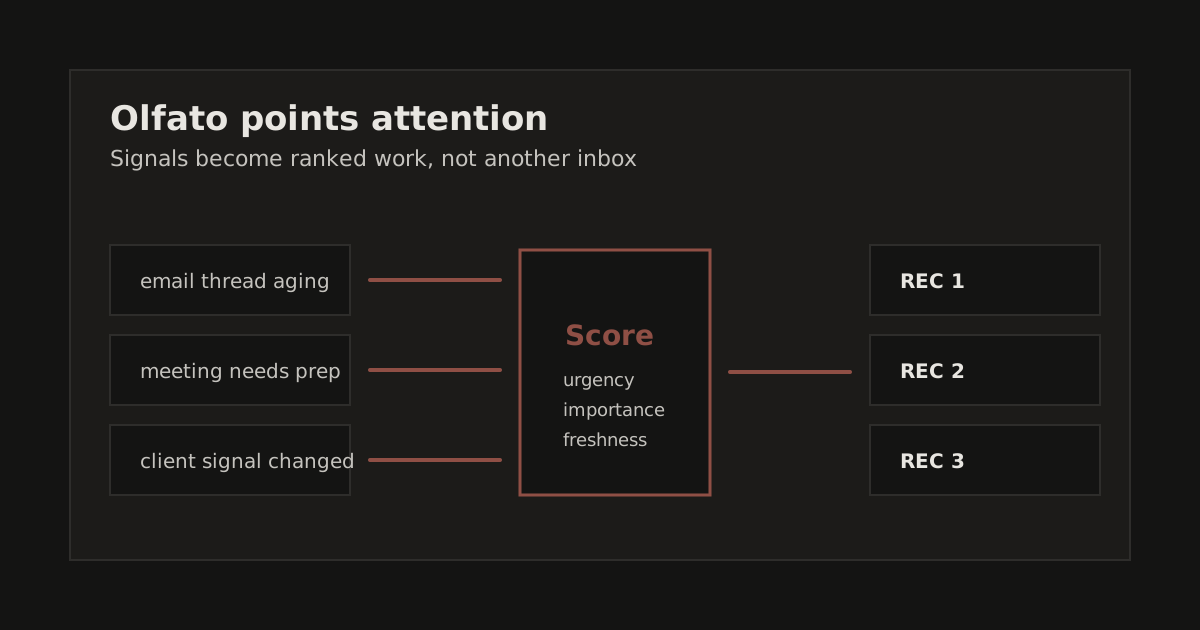
The agent is only one part of the system. The durable asset is the attention layer around it: what gets scanned, what gets scored, what reaches review, and what stays quiet.
Most people building AI agents obsess over what the agent can do. Tools, APIs, function calling, multi-step reasoning. The frontier has moved past capability. The real question is: what should the agent do right now?
I run three AI agents across my businesses. Chief of Staff, Head of Sales, Head of Product. They have access to email, calendar, Slack, iMessage, WhatsApp, task management, CRM data, and a knowledge vault. They are not short on capability.
They were short on attention.
The Problem: Capable Agents With No Priorities
In my system, giving an agent full context was not enough. The agents could answer hard questions once I pointed them at the right material. They still needed a way to decide which material deserved attention first.
Without that layer, the newest visible item tended to dominate the work. A recent Slack message could pull more attention than an older client follow-up. A stale metric could sit in a file until something else brought it forward. Work buried in a working-context file was technically available, but it was not yet operationally present.
The gap was not intelligence. It was triage. The agents could analyze what I selected. They did not yet have a durable process for selecting what mattered next.
The Attention Layer
I built an intent engine. It runs every 5 minutes as part of a 9-step pipeline. 31 detectors scan every data source my agents touch:
- Gmail (2 accounts, real-time via PubSub): unreplied threads, high-priority senders, threads aging past thresholds
- Calendar (2 accounts): meetings needing prep, scheduling conflicts
- iMessage + WhatsApp: unreplied personal messages, business contacts going cold
- Claudia (task management): overdue tasks, stalled one-things, blocked work
- Pipeline/CRM: deals going cold, follow-ups overdue, stage transitions
- Slack channels: quiet channels that should be active, conversations with no follow-up
- Working-context files: refreshed data that still needs an agent or human to review it
- Goal gauges: metrics trending wrong, KPIs with no data, velocity stalls
Each detector produces signals. Each signal gets a score from 0-100 using four weighted factors:
| Factor | Weight | What It Measures |
|---|---|---|
| Urgency | 35% | How time-sensitive. A 4-hour-old client email scores higher than a 2-day-old newsletter. |
| Importance | 35% | How much it matters. A key account follow-up outranks an internal status update. |
| Freshness | 15% | How recently it appeared. Newer signals get a boost. Prevents ancient items from clogging the queue. |
| Confidence | 15% | How certain the detector is. A clear "unreplied email from known contact" beats a heuristic guess. |
The top 7 signals per agent become their actionable inbox. Not a firehose. A curated, scored, situation-aware priority list.
What a Situation Report Looks Like
Every 5 minutes, each agent gets something like this:
### Situation Report
3 high, 4 medium. Top: a channel has gone quiet, post an update

### HIGH (60-89)
- [69] [PRODUCT] Channel has no recent messages, post an update
  Source: Slack
  Action: Channel is quiet. Post a status update, share a finding, or propose next steps.

- [69] [PRODUCT] Evaluation channel has no recent messages
  Source: Slack
  Action: Channel is quiet. Post a status update or propose next steps.

- [67] [PRODUCT] New data available but no follow-up posted
  Source: Working context
  Action: Working-context was refreshed with new data. Review and post findings.

### MEDIUM (30-59)
- [56] [GAUGE] Discovery, no data (0 qualified opportunities → 3)
  Source: Goals
  Action: Gauge has no recent data, propose measurement
That's Steve's actual queue from today. He doesn't wonder what to work on. He knows.
Pre-Generated Recommendations
The intent queue tells the agent what to pay attention to. But converting an intent into a posted recommendation still requires the agent to read context, draft a message, format it correctly, and post it. Under context compaction (when the conversation history gets too long and the system compresses it), this multi-step process breaks down.
So I added a second stage: the rec-formatter. It reads each agent's intent queue and pre-generates draft recommendations with full context:
### REC 1, Channel has gone quiet, post an update
**Score:** 69
**Main:** `rec: Channel has no recent messages, post an update. Review in thread.`
**Thread:**
- **Intent:** Channel has no recent messages, post an update
- **Source:** Slack
- **What to do:** Channel is quiet. Post a status update, share a finding, or propose next steps.
- **Context:** Active channels should have regular activity to keep momentum.
- **Options:** send / edit / skip / snooze 4h
The agent reviews and posts. It doesn't generate from scratch. The cognitive load shifts from creation to judgment. That's a much easier task for an LLM to do reliably.
The Bug That Proved the System Works
Here's a story that made the whole system real for me.
Steve (Head of Product) had zero intents. Every cycle, his queue came back empty. Meanwhile Clawd (Chief of Staff) had 7-8 intents and Alex (Head of Sales) had 3-4. I assumed Steve just had fewer triggers because his domain (product strategy) generates less automated signal than email triage or sales pipeline management.
Wrong.
The intent engine parses Claudia's goal output to detect gauge health. The output looks like this:
Goal: $13K MRR Product [steve]
  Discovery ⚫ 0/3 qualified opportunities
  Validation ⚫ 0/1 proven WTP
  Build ⚫ 0/1 MVP shipped
  Revenue ⚫ 0/13000 MRR
The parent goal line has [steve], that's the agent tag. But
the child KPI lines (Discovery, Validation, etc.) don't repeat the tag.
They're indented. The detector was looking for [agent] tags on
every line, and when it didn't find one on the child lines, it fell back to
a default: "clawd".
Steve's four KPIs were being silently routed to Clawd.
The system was running without errors or warnings. A quiet routing bug had made one agent dormant and another agent slightly busier, and the only visible symptom was that Steve's queue was always empty.
The fix was 15 lines: track the parent goal's agent tag and let child KPIs inherit it. After the fix, Steve went from 0 intents to 7 per cycle. Three product-specific detectors brought the total from 28 to 31.
This is the kind of bug you only catch when you build the observability layer. Without the intent queue as a visible output, the misroute would have been invisible. The system would have looked healthy while one-third of the operation was deaf.
The 9-Step Pipeline
The full pipeline runs every 5 minutes via cron:
Phase 1: Sync communication logs
Phase 2: Refresh working context from external sources
Phase 3: Sync registries (contacts, topics, touchpoints)
Phase 4: Run intent engine (31 detectors → ranked queues)
Phase 5: Pre-generate recommendation drafts
Phase 6: Compile boot payloads per agent
Each phase is a standalone script that writes to the filesystem and reads from the previous phase's output. There is no database, message queue, or orchestration framework. Just files, cron, and file locks to prevent overlap.
The boot compiler at the end stitches everything into a single payload per agent: 40-80K tokens of compiled context that includes Slack history, working-context, Obsidian docs, intent queue, rec: drafts, morning briefing, and a brief summary of what the other agents are working on.
Every agent boots fresh every session with the operating state it needs. They don't remember. They don't need to. The system assembles the work surface for them.
What Changed
Before the attention layer, my agents were mostly reactive. They were useful when I started the exchange, sent a message, or opened a session with the right context already loaded.
After the attention layer, the session starts with a ranked plan. A chief of staff agent can see an unreplied email, a meeting that needs prep, and a metric that needs measurement. A product agent can see a quiet channel, a gauge with no data, and a refreshed working-context file. A sales agent can see a cold deal and an overdue follow-up.
The agents still need human approval before acting externally. They post recommendations to Slack. The human reviews, approves, edits, or skips. But the initiative has shifted. The agent isn't waiting to be told what to do. It's telling you what it thinks should happen next.
That is the difference I wanted: an operator surface that brings the next decision into view.
The Architecture Insight
If you're building AI agents, here's the thing I wish someone had told me:
Capability is table stakes. Attention is the differentiator.
Every agent framework gives you tool use, memory, and multi-step reasoning. None of them answer the question: "What should this agent do right now, without being asked?"
The answer isn't more sophisticated prompting. It's infrastructure. A pipeline that runs on a schedule, scans every data source, scores what it finds, and surfaces the top priorities in a format the agent can act on immediately.
The operating system is plain: 31 detectors, 0-100 scoring, 7 items per agent, pre-generated recommendations, a 5-minute refresh, and files on disk.
The boring infrastructure is the product.