The CI Pipeline I Actually Want
I wrote previously about giving Claude permission to deploy. That post was about trust. This one is about the safety net that makes that trust rational.
I just shipped a CI pipeline for Claudia that covers iOS, web, backend, and database, all with the same three-layer pattern. It took a conversation, not a sprint. Here's the design behind it, and the books that informed it.
The Problem With Most CI Setups
The CI pipelines I trust are designed, not accumulated. A lint step, a test runner, and a YAML file are useful only when the whole system gives fast feedback and clear failure signals.
The failure mode isn't "no CI." It's CI that doesn't earn trust. Tests that flake. Checks that run on every push regardless of what changed. Pipelines that take 20 minutes so people stop waiting for them.
I wanted something different: a pipeline I'd actually trust with my deploying-AI-agent workflow. If Claude is going to ship code autonomously, the safety net has to be real.
The Design: Two Stages, Not One
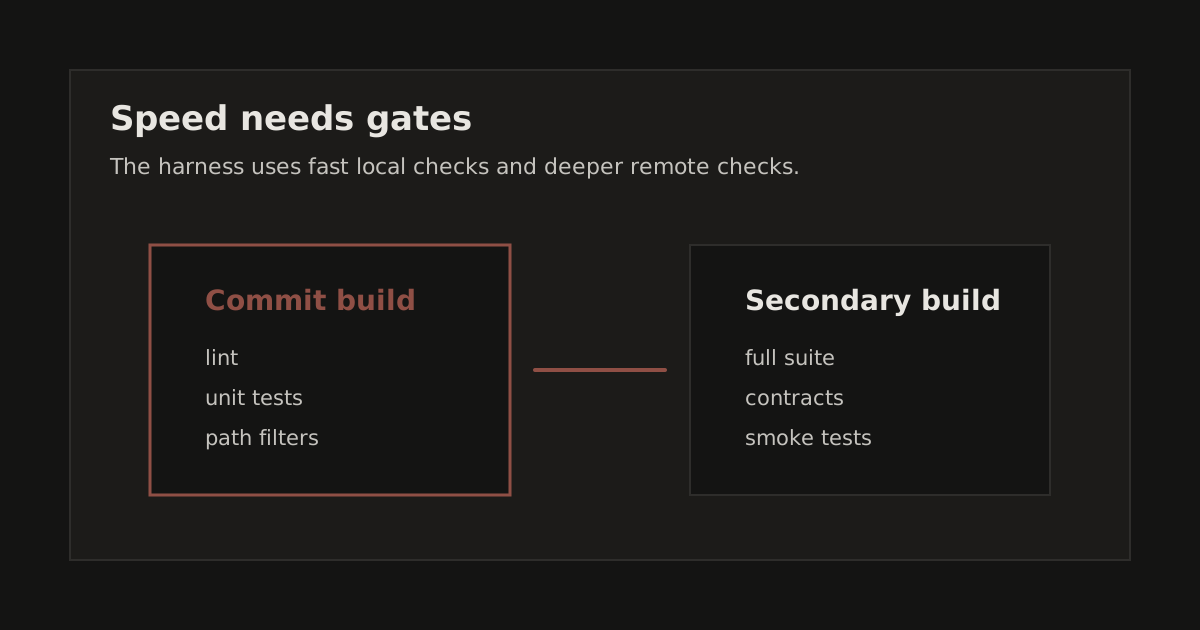
Martin Fowler's CI writing describes a two-stage model that most teams skip:
Stage 1: "Commit build." Fast. Runs locally. Catches the obvious stuff before code leaves your machine. Target: under 15 seconds.
Stage 2: "Secondary build." Thorough. Runs on CI. Takes minutes. Does everything you can't afford to do locally.
Most teams only have Stage 2. They push, wait, context-switch, come back, see red, fix, push again. The feedback loop is measured in minutes.
With both stages, the feedback loop for common mistakes is seconds. The red notification on CI becomes rare, and when it fires, you take it seriously.
Here's what that looks like concretely:
Local (< 15 sec):
- iOS changes? SwiftLint.
- Web changes? TypeScript check + unit tests.
- Backend changes?
deno lint. - Migration changes? Safety lint for dangerous SQL patterns.
Remote (GitHub Actions):
- iOS: SwiftLint + full Xcode build + test suite + secrets scan.
- Web: ESLint + TypeScript + Vitest + Next.js build + Playwright screenshots.
- Backend: Deno lint + function tests + migration safety lint.
The local hook detects which files changed and only runs relevant checks. Push a Swift file? You don't wait for npm test. Push a migration? You don't wait for SwiftLint.
Same Three Layers, Every Surface
This is the structural idea that made everything click. Every surface, iOS, web, backend, database, gets the same three layers:
1. Lint, Is the code well-formed?
2. Test, Does the code work?
3. Safety net, Will we notice when something drifts?
For iOS, that's SwiftLint → unit tests → snapshot tests.
For web, that's ESLint → Vitest → Playwright screenshots.
For backend, that's Deno lint → function tests → migration safety lint.
For database, that's migration safety lint → RLS policy tests → schema drift detection.
Same pattern. Four times. No surface gets special treatment, no surface gets forgotten.
SwiftLint Baseline: How to Add Linting to an Existing Codebase
One of the best ideas I borrowed: SwiftLint's baseline feature.
The problem with adding a linter to a mature codebase is practical. You turn it on, get hundreds of warnings, and the team has to decide whether the current work stops for cleanup.
The baseline freezes all existing violations. Day one: 344 warnings, 0 failures. Day two: if you add one new violation, you get exactly 1 failure. The ratchet only moves forward.
This is the only sane way to adopt a linter retroactively. You get the benefit for all new code immediately, and you can chip away at the baseline over time, or not. Your choice.
Migration Safety Lint
Claudia has migration files, so I added a specific lint pass for them.
I wrote a 60-line bash script that catches:
DROP TABLEorDROP COLUMNwithout an explicit danger commentDELETE FROMwithout aWHEREclauseTRUNCATEwithout acknowledgmentALTER TYPE(which can lock tables for minutes)DROPwithoutIF EXISTS
These aren't style issues. These are "you just deleted production data" issues. The script runs locally in milliseconds and in CI on every push that touches a migration file.
I would rather catch these patterns before the migration reaches production.
Path Filtering: Don't Waste Money
GitHub Actions macOS runners cost $0.08/minute. An iOS build takes 5-10 minutes. That's $0.40-0.80 per run.
If your iOS CI runs on every push, including documentation changes, web fixes, migration updates, you're burning money and training your team to ignore CI.
Path filtering fixes this. Each workflow declares which paths trigger it:
paths:
  - 'Claudia/**'
  - 'ClaudiaTests/**'
  - '.swiftlint.yml'
Push a web change? The iOS workflow doesn't run. Push a migration? Only the backend workflow fires. Monthly CI cost: under $15 at 5-10 pushes per week.
What Kent Beck Taught Me About Tests
Kent Beck's Test Desiderata lists 12 properties of good tests. I used six as a checklist for every test I wrote:
- Fast, unit tests under 100ms each. My full web suite runs in 770ms.
- Isolated, no shared state, no ordering dependency. Every test creates its own data.
- Deterministic, same input, same result. No network calls, no
Date.now()in assertions. - Behavioral, tests behavior, not implementation. If I rename a private method, no tests break.
- Structure-insensitive, tests survive refactoring. They test "what" not "how."
- Readable, the test name describes the scenario.
"Monthly: Jan 31 advances to Feb 28 in non-leap year"tells you exactly what's being verified.
The temptation with AI-generated tests is to go for quantity. 200 tests that cover every method signature. Beck's framework says: fewer tests that are actually good. Tests you trust enough to deploy when they're green.
The Failure Protocol
Fowler's CI principle is blunt about the build taking priority when it fails.
When CI goes red on main, the next push must fix it or revert the breaking change. Don't stack more changes on a red main. Don't open a ticket. Don't "get to it later."
This is strict on purpose. A red build that stays red teaches the wrong lesson. A red build that gets fixed in the next commit keeps CI as the floor.
For a solo operator or small team, this matters because there is less review capacity around the work. The pipeline has to make drift visible early.
The DORA Connection
Google's DORA research defines four metrics for elite engineering teams:
- Deploy multiple times per day
- Lead time under one hour
- Change failure rate under 15%
- Restore service in under one hour
A good CI pipeline supports those metrics by shortening feedback loops, making deploys easier to trust, and giving failures a faster path back to diagnosis.
The 2025 DORA report adds an uncomfortable finding: "AI doesn't fix a team; it amplifies what's already there." If your pipeline is solid, AI makes you faster. If your pipeline is missing, AI makes you break things faster.
This is why I built the pipeline before leaning harder into autonomous deployment. The safety net has to exist before you need it.
What I Skipped (For Now)
Charity Majors argues that pre-production testing has diminishing returns. The real safety comes from observability in production: feature flags, canary deploys, structured logging, SLOs.
She's right. But she's talking about teams with production traffic. Claudia isn't there yet. When it is, the pipeline extends naturally:
- Feature flags to decouple deploys from releases
- Canary deploys (ship to 1% first)
- Structured logging for debugging production issues
- SLOs as the health dashboard
The pipeline is the foundation. Observability is the next floor.
The Meta-Point
This pipeline took one Claude Code session to design and implement, across 21 new files and 5 phases. It went that fast because the design was clear before I started.
That's the leverage of reading Fowler, Beck, and the DORA reports before writing YAML. The best references compress decades of CI/CD experience into principles you can apply in an afternoon.
Most developers learn CI by copying someone else's workflow file and tweaking it until the tests pass. That gives you a pipeline. Reading the sources gives you a pipeline you can reason about, extend, and trust.
Try This
If you're building a multi-surface product (mobile + web + backend):
- Two stages. Local hook for fast feedback, CI for thorough checks.
- Same layers everywhere. Lint, test, safety net, every surface.
- Path filter everything. Don't run iOS CI on web changes.
- Baseline your linter. Freeze existing violations, enforce on new code.
- Lint your migrations. A small shell check catches dangerous SQL patterns.
- Read Beck's Test Desiderata. Then delete half the tests you were going to write.
The code is in the Claudia repo. Adapt it for your stack.
Sources
These are worth reading in full, for CI and for how to think about software quality:
- Martin Fowler, Continuous Integration. The two-stage pipeline model, build repair discipline, and self-testing code as prerequisite for CI.
- Kent Beck, Test Desiderata. 12 properties of good tests. "No property should be given up without receiving a property of greater value in return."
- Google DORA, State of AI-Assisted Software Development. Elite benchmarks and the finding that "AI doesn't fix a team; it amplifies what's already there."
- Charity Majors, Testing in Production. Pre-production testing has diminishing returns. Real safety = observability + feature flags + canary deploys.
- Gergely Orosz, Unit Testing Benefits Pyramid. Testing benefits compound: validate work, separate concerns, living documentation, fewer regressions, safety net for refactoring.